

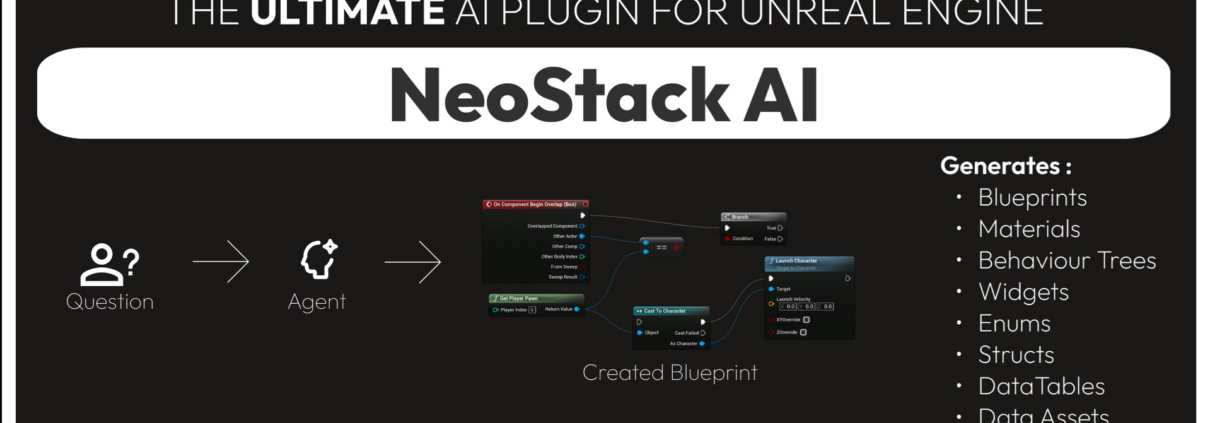
Co-Developing Unreal Engine Video Games using Local Ollama LLM Models with the Latest v1.0.66 Beta Version of the Betide NeoStack AI Unreal Plugin
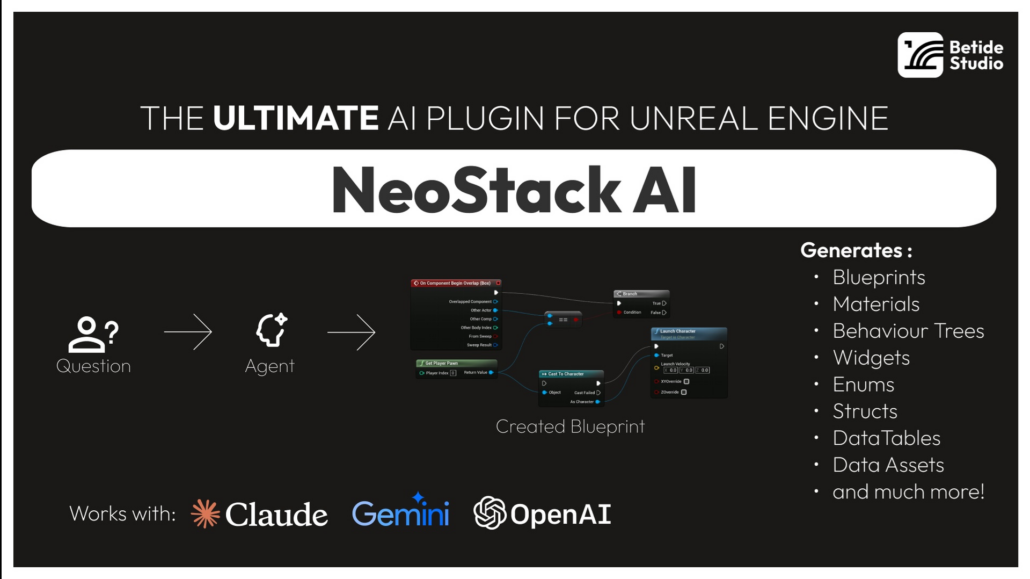
Back in February I started testing the NeoStack AI Plugin by BETIDE STUDIO for AI assisted Unreal Engine game development. The NeoStack AI plugin is still in Beta, and I am currently testing the latest beta version (v1.0.66).

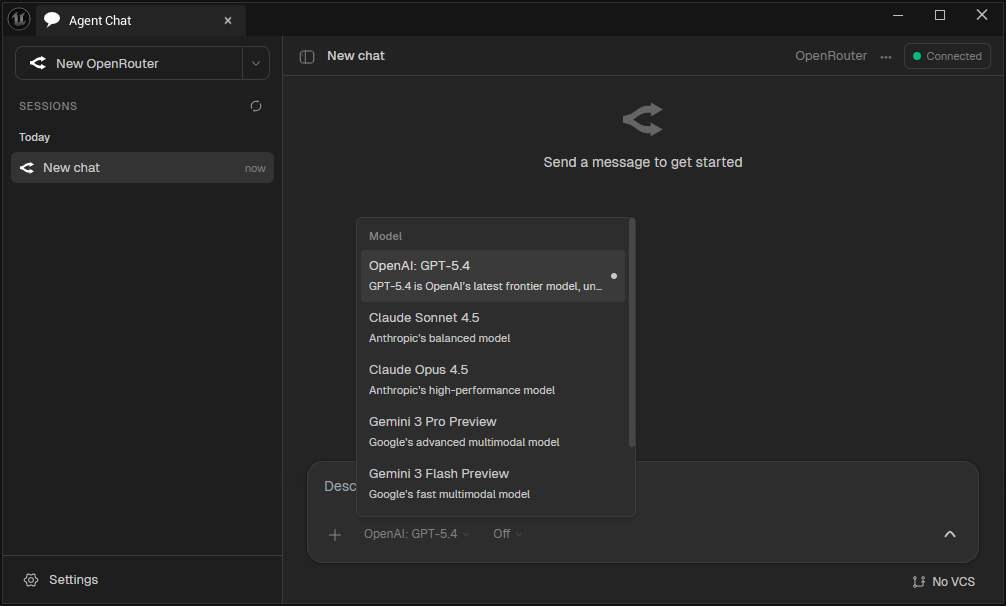
In addition to using OpenRouter to run free LLM models, NeoStack AI recently added the capability to run my free local LLM models via Ollama running on my GeForce RTX-3080.
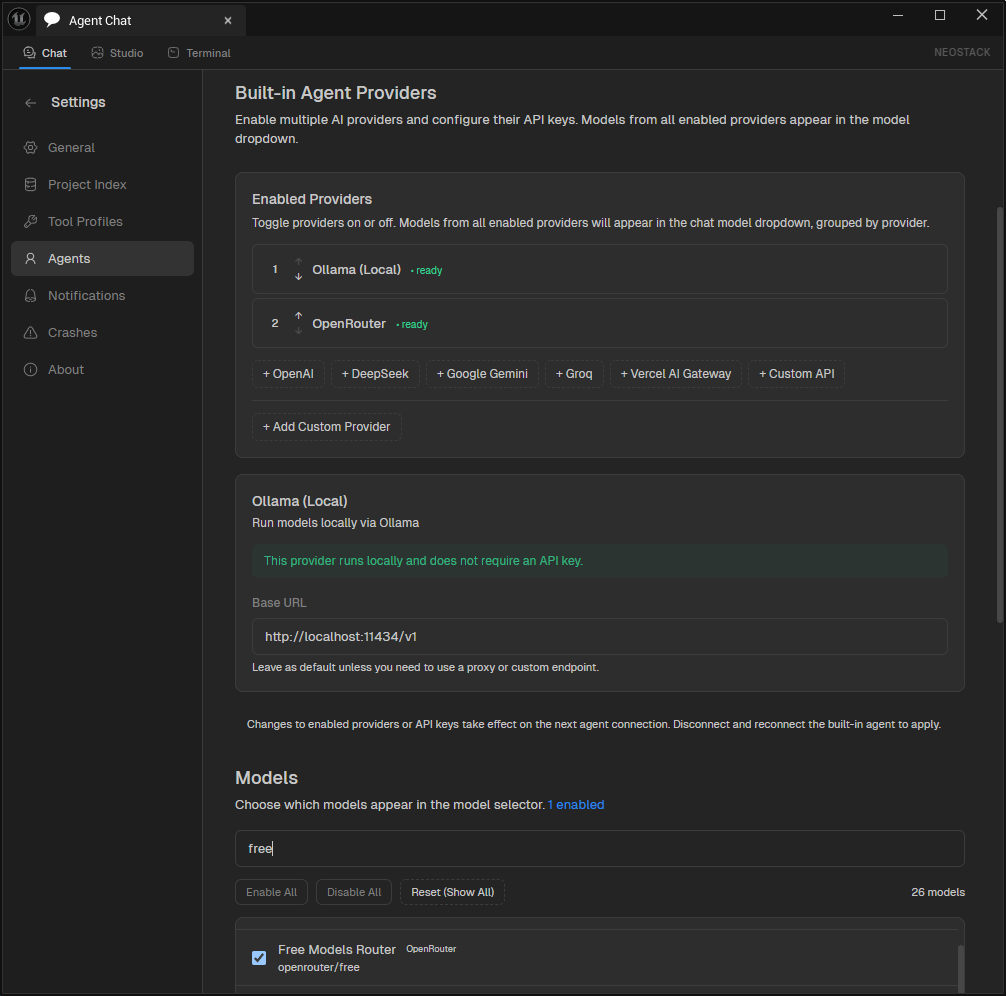
I am really excited to use their new Ollama Local LLM model capability so I can take advantage of the free processing power of my offline NVIDIA GeForce RTX-3080 Graphics card.
As a reminder, the key features of the NeoStack AI are:
- Multi-Agent Support – Connect to Claude Code, Gemini CLI, or OpenRouter
- Native Editor UI – Slate-based chat window with streaming responses
- Asset Generation – Create Blueprints, Materials, Behavior Trees, Data Tables and more
- Context Attachments – Attach Blueprint nodes or assets to your prompts
- Project Indexing – Automatic project indexing for context-aware suggestions
I’ll continue to keep you update on both my cloud and local LLM testing with NeoStack AI for Unreal Engine.
OpenAI Releases GPT-5.4 and it is State of the Art (SOTA) across Key Coding Benchmarks
On March 5th, 2026, OpenAI released GPT-5.4 GPT-5.4 brings together the best of their “recent advances in reasoning, coding, and agentic workflows into a single frontier model”. OpenAI said that GPT-5.4 “incorporates the industry-leading coding capabilities of GPT‑5.3‑Codex while improving how the model works across tools, software environments, and professional tasks involving spreadsheets, presentations, and documents.” GPT 5.3 Coden is great for agentic coding and combining it with GPT-5.4 helps you get real work done accurately, effectively, and efficiently.
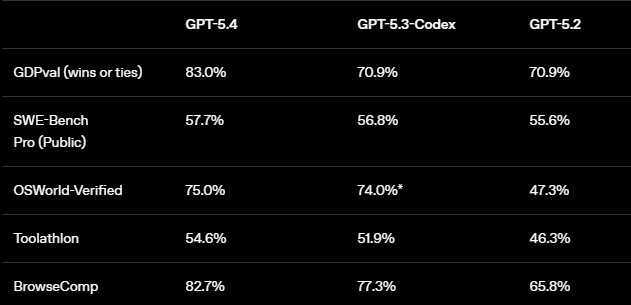
OpenAI shared the following benchmarks comparing 5.4 to 5.3 Codex and GPT 5.2 in their announcement:
For Coding, they also shared their SWE-Bench Pro (public) Accuracy vs Latency Benchmarks:
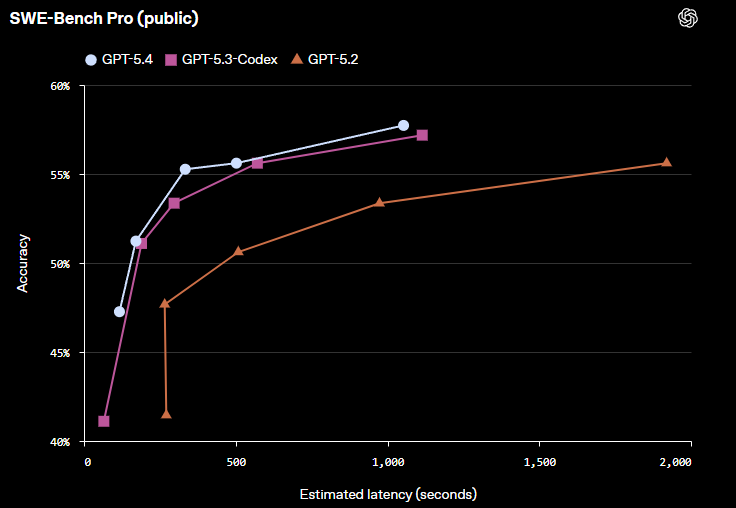
As a demonstration of their model’s improved computer-use and coding capabilities working in tandem, they released an experimental Codex skill called “Playwright (Interactive)(opens in a new window)”. This new skill “allows Codex to visually debug web and Electron apps; it can even be used to test an app it’s building, as it’s building it.”
I can’t wait to test and see how it has improved AI assisted game development! I’ll let you know how my testing goes via my AI Assisted Unreal Engine video game development project using my Betide NeoStack AI Plugin and my OpenRouter account.

Epic Games recently acquired Meshcapade, a startup specializing in AI technologies for creating and animating hyper-realistic digital human models and animations from video recordings
Epic Games recently acquired Meshcapade, a startup specializing in AI technologies for creating and animating hyper-realistic digital humans. Meshcapade, a spin-off from the Max Planck Institute for Intelligent Systems based in Tübingen, Germany, develops AI tools that generate precise 3D body models and animations from video recordings.
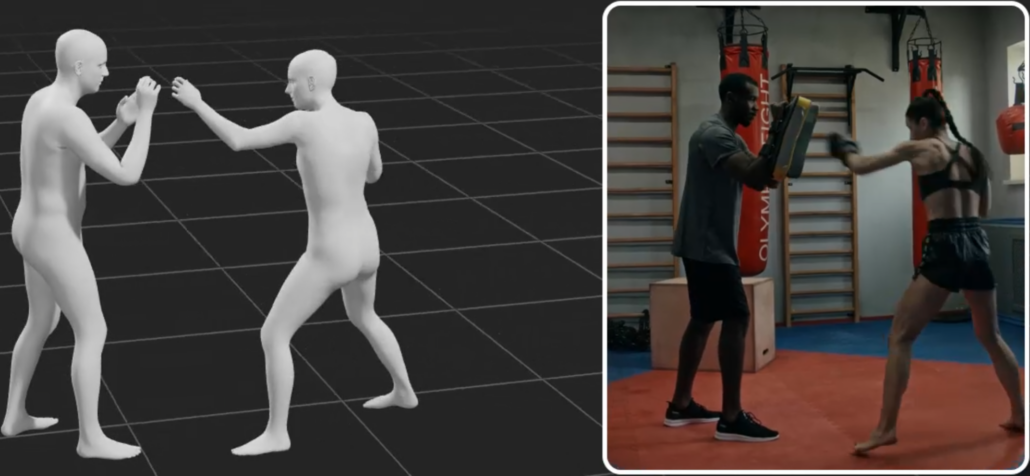
Meshcapade’s AI tools, built on the SMPL (Skinned Multi-Person Linear) parametric body model, primarily target and automate the body modeling and full-body motion capture stages in Epic’s MetaHuman pipeline, which currently relies on limited presets for bodies and less advanced video-based tracking for animation.
What Meshcapade Replaces in the current MetaHuman Pipeline:
- Preset/Manual Body Modeling: Replaces MetaHuman Creator’s ~50 preset bodies and external sculpting/rigging with AI-generated custom SMPL bodies from a single image, video clip, or scan. It extracts precise shape, pose, and clothing details automatically—no manual adjustments needed.
- Expensive Mocap Hardware: Replaces marker/suit-based systems (e.g., optical mocap studios) with markerless full-body capture from any camera (phone/webcam/pro). It tracks subtle motions like fingers/hands, camera movement, and multi-person scenes.
- Fragmented Body Animation: Complements/enhances MetaHuman Animator’s body solve with superior AI-driven full-body mocap, reducing retargeting hassles (pre-acquisition the plugin existed; now it will become native).
With the acquisition, Epic says it’s “looking forward to working together to advance digital human technologies for use across gaming, film and entertainment.” I’m personally looking forward to a much simpler MetaHuman creation and animation pipeline for video game development and virtual production. development.
Claude Sonnet 4.6 Released on February 17, 2026
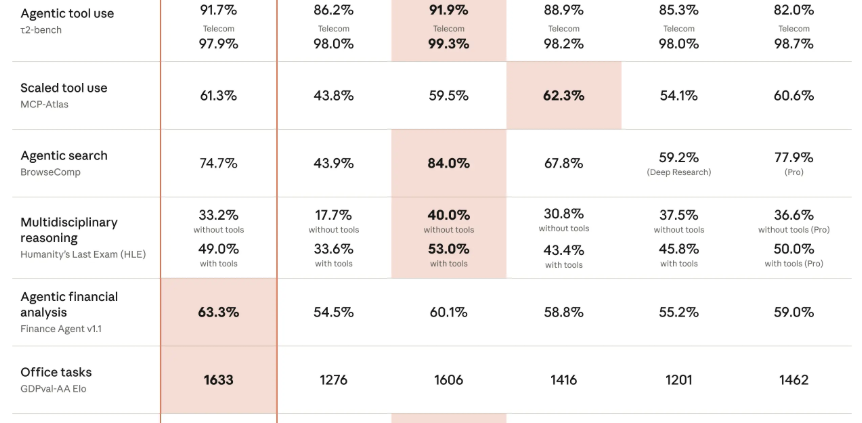
Anthropic released Claude Sonnet 4.6 on February 17, 2026 – almost 2 weeks after releasing their flagship Claude Opus 4.6 model. Below are the latest benchmarks that Anthropic published in their Claude Sonnet 4.6 announcement:
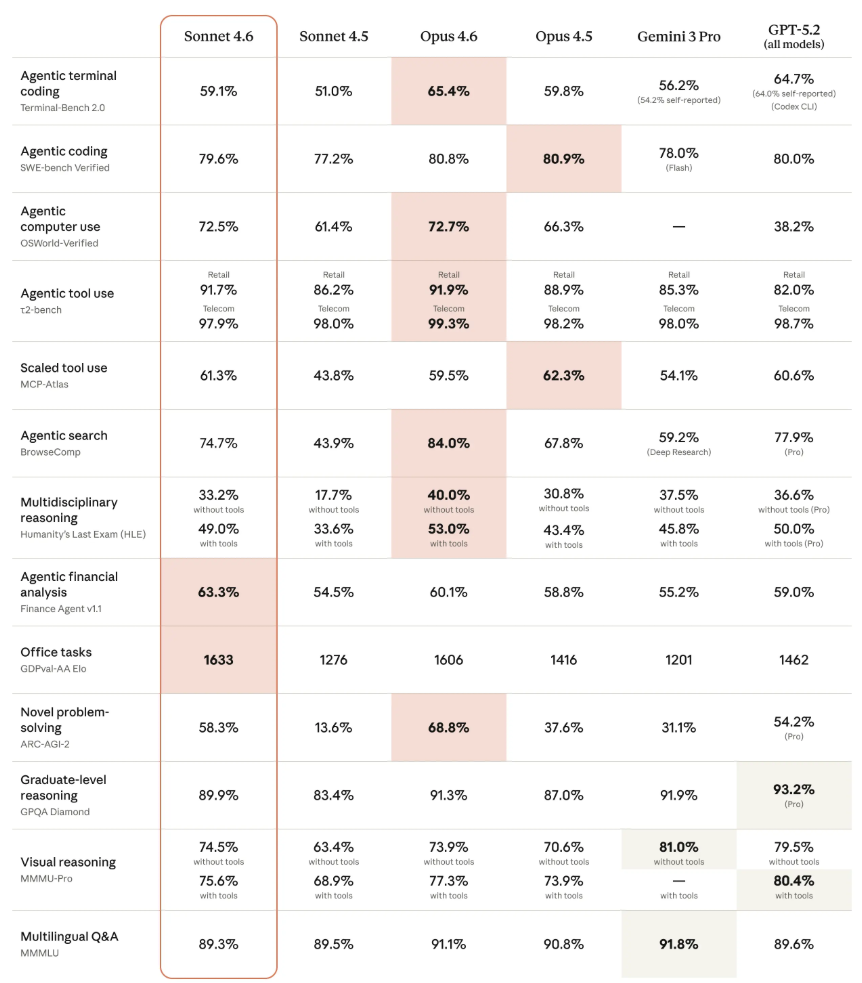
You can read more about Anthropic Claude Sonnet 4.6 here.

AI Co-Development Just Got a Lot Easier with the Release of Claude Opus 4.6 and Open AI GPT 5.3 Codex on February 5, 2026
In this article, I will compare two specific domains: coding an agentic application (e.g., autonomous AI agents that use tools, plan multi-step workflows, interact with environments like terminals/browsers, debug in loops, and handle real-world software engineering) and game development (e.g., designing game logic, implementing mechanics in engines like Pygame/Unity-style code, handling physics/AI/pathfinding, procedural generation, balancing systems, and iterating on prototypes).
On February 5, 2026 Anthropic released Claude Opus 4.6 which is their current flagship, optimized for the most demanding, long-horizon, and complex tasks. On the very same day, OpenAI released GPT-5.3 Codex (the dedicated agentic coding line). GPT-5.3 Codex is OpenAI’s current flagship for advanced coding and agentic workflows.
Key Specs Comparison:
Context Window: Claude Sonnet 4.5: 200K tokens Claude Opus 4.6: 200K standard / 1M tokens (beta, with much higher reliability) GPT-5.3-Codex: Not explicitly stated in releases (likely 200K–512K range, consistent with GPT-5 family; strong on long-horizon without 1M claims yet)
Pricing (API, per million tokens) Sonnet 4.5: $3 input / $15 output Opus 4.6: $5 input / $25 output (higher beyond 200K) GPT-5.3-Codex: Similar to prior GPT-5.x tiers (~$5–15 input / $15–75 output range; exact Codex rates match high-tier GPT access via app/CLI/API)
Speed Sonnet 4.5: Fastest of the three for iteration Opus 4.6: Slower (deeper thinking/effort modes) GPT-5.3-Codex: ~25% faster than GPT-5.2-Codex; feels responsive for agent steering
Reasoning/Agent Style All three are hybrid/agentic-tuned. Opus 4.6 has adaptive effort + best long-horizon sustain. GPT-5.3-Codex emphasizes steerable, interactive agents (you guide mid-task without context loss). Sonnet 4.5 balances speed + quality.
Performance on Agentic Coding / Building Agentic Applications:
This category is extremely competitive right now — the February 5 releases were direct head-to-heads.
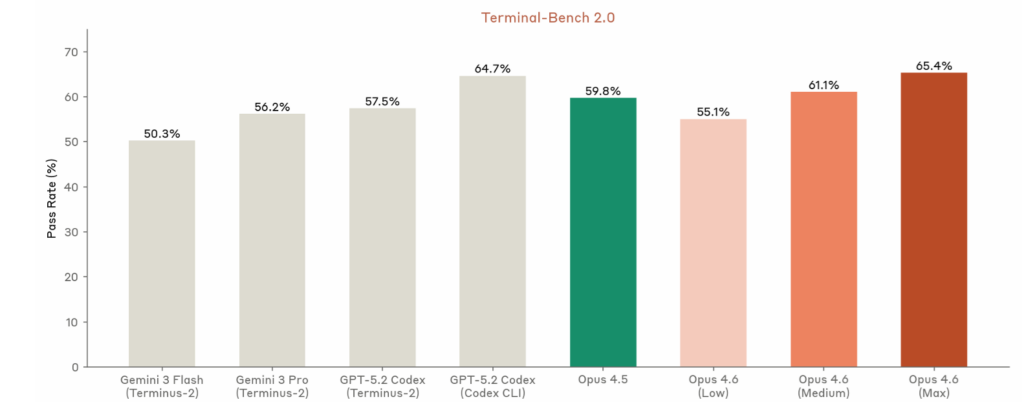
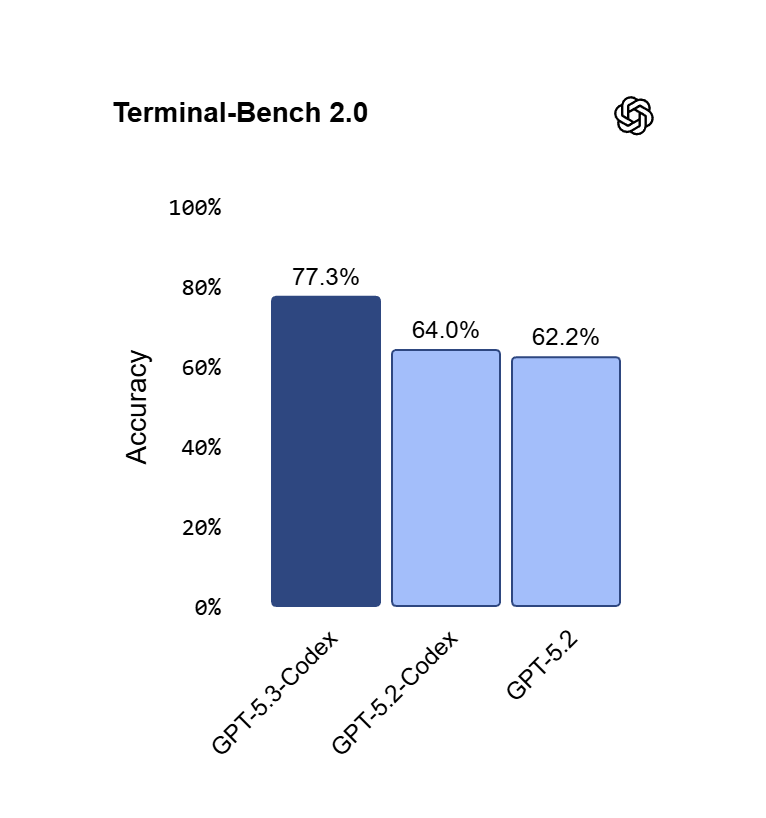
- Terminal-Bench 2.0 (terminal/tool-use agentic coding): GPT-5.3-Codex leads at ~77.3% (state-of-the-art claim); Opus 4.6 close behind (~65–72% range in prior reports, but Anthropic claims top on agent evals); Sonnet 4.5 lower (~51%).
- SWE-Bench Pro/Verified (real GitHub issues, multi-lang): GPT-5.3-Codex hits new highs on Pro variant (multi-lang, harder); Opus 4.6 edges on Verified for complex fixes (~80–81%); Sonnet 4.5 strong but trails slightly.
- OSWorld / Computer Use: GPT-5.3-Codex strong (~64–65%); Opus 4.6 leads in sustained GUI/terminal chains.
- Long-horizon Agents: Opus 4.6 excels at multi-hour autonomous runs, massive context, self-correction. GPT-5.3-Codex shines on interactive steering (like a live colleague) + tool/research chaining. Sonnet 4.5 great for volume/prototyping but needs more retries on extreme complexity.
- Real-world vibe: Developers report GPT-5.3-Codex feels “more Claude-like” than prior OpenAI models (better git, debugging, broad tasks). Opus 4.6 often wins on deep codebase navigation + fewer hallucinations. Many use both in parallel.
Below is Anthropic’s Terminal Bench 2.0 Rating of 65.4% published by Anthropic:
Below is OpenAI’s GPT-5.3 Codex Terminal Bench 2.0 Rating of 77.3% published by OpenAI:
For serious agentic apps (autonomous tools, computer-use agents, production reliability): It’s a toss-up between Opus 4.6 (best long sustain + 1M context) and GPT-5.3-Codex (interactive steering + benchmark edges). Sonnet 4.5 is excellent but not quite frontier here.
Performance on Game Development
Game development favors creativity + systems integration + rapid iteration (mechanics, AI, procedural gen, balancing, physics sims). All three handle Pygame prototypes, Godot/Unity pseudocode, NPC AI, etc., very well.
- Sonnet 4.5: Best for fast prototypes/iterations — clean loops, quick balancing tweaks, simple pathfinding/behavior trees. Preferred for indie-speed work.
- Opus 4.6: Pulls ahead on complex, interconnected systems (e.g., economy + AI opponents + physics + UI + narrative). Better at coherent large-scale design → code chains, debugging edge cases in bigger codebases, creative-yet-coherent ideas.
- GPT-5.3-Codex: Strong contender — OpenAI highlights building “highly functional complex games and apps from scratch over days.” Excels at multi-step execution + research/tool use (e.g., pulling refs for mechanics). Feels more “productive” for iterative game workflows.
For most game prototypes/indie development: Sonnet 4.5 (speed + cost) or GPT-5.3-Codex (if you want interactive guidance).
For ambitious/systems-heavy games (e.g., simulation layers, procedural worlds, long development cycles): Opus 4.6 edges out slightly on cohesion + autonomy, but GPT-5.3-Codex is very close and often faster to iterate.
My Current Recommendation for Cloud AI Agent Assisted Development:
- Claude Sonnet 4.5 — Default choice for 80% of agentic coding + game development: fast, cheap, reliable near-frontier.
- Claude Opus 4.6 — Pick for the hardest agentic/long-horizon work, massive context, or when you need max reliability/cohesion (especially complex games or production agents).
- GPT-5.3-Codex — Pick (or combine) if you value interactive steering, OpenAI ecosystem (Codex app/CLI/Copilot integration), or hit edges where OpenAI’s benchmarks shine. It’s neck-and-neck with Opus 4.6 right now — many developers test both on the same task.
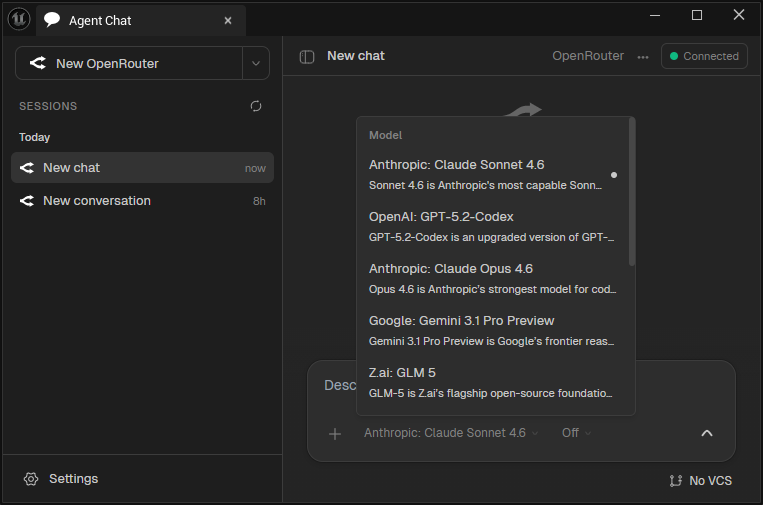
I am currently using the Claude models with my OpenRouter account as I test the Neostack AI Plugin for Unreal Game Development.
Bottom line, the AI Assisted Video Game Development race is razor-close! Real preference often comes down to workflow (e.g., Claude Code vs. Codex app), ecosystem lock-in, and the development tools for your specific game project. In a future post, I will go over using Claude with the Unreal Engine Game and the Betide Noestack AI Plugin.

